Get A Read-Only NWC Code from Rizful
A read-only NWC code lets an app create invoices and see what has been paid, without any permission to spend from your vault. Rizful's button calls it receive-only, and that's the word you'll see below.
Step 1: Open NWC Settings
From the main menu in Rizful, tap on NWC to access your Nostr Wallet Connect settings.
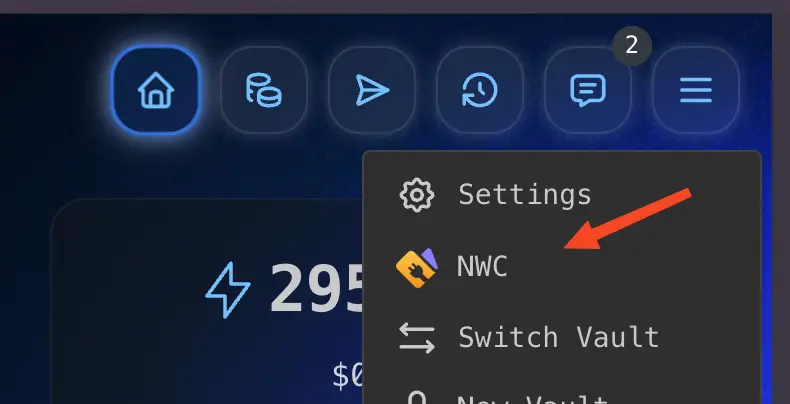
Step 2: Copy the Receive-Only Code
In the Get NWC Codes window, tap Copy receive-only code. You can now paste that NWC string into the app that needs to receive payments.

What Can You Do With This Code?
This receive-only NWC code can be safely used with:
- 🛍️ Your own website or app, using OpenReceive — a free, open-source library that accepts Lightning (and optionally USDT/USDC/ETH/SOL) straight into your Rizful vault
- 🛒 Your Shopify store, using BLFS, Bitcoin Lightning for Shopify (its Step 1 asks for exactly this code)
- 💬 Nostr zap receivers to receive tips on social media
- 📱 Any app that needs to send payments to you
Because it's receive-only, even if the code is compromised, your funds remain safe. The app can receive payments, but it cannot spend your Bitcoin.
This receive-only code is the only credential OpenReceive needs. Put it in your server environment as NWC_URI and your site can take Bitcoin payments with no account, API key, or KYC.
What This Code Can Do
A receive-only code allows the NWC methods make_invoice, lookup_invoice, get_info, get_balance, and list_transactions, the hold-invoice methods make_hold_invoice, settle_hold_invoice and cancel_hold_invoice, and payment notifications. It can not pay invoices or send keysends (pay_invoice and pay_keysend are refused: Rizful answers "Method not supported"), so an app holding this code can create invoices and watch them get paid, but it can never move funds out of your vault.
It can see your balance and your payments, though, so keep it private and only give it to apps you want to have that information.
Want to try this without exposing your main vault? Set up a test vault first.