
My Lightning Payment Failed With 'No Route' -- What Does That Mean?
First of all: sorry. This error is annoying.
And, even worse, it is not very specific. A Lightning wallet saying "No Route" can mean a LOT of different things.
It usually does not mean that Bitcoin is broken. It usually does not mean you did anything wrong. It usually means something much more boring:
Your wallet could not find a working path for this payment right now.
That's it. Helpful? Not really. But we can work with it.
What it looks like in a real wallet
Here's a twist: a lot of wallets never say "no route" at all. We made two payments fail on purpose, from our own wallets, for the video on this page.
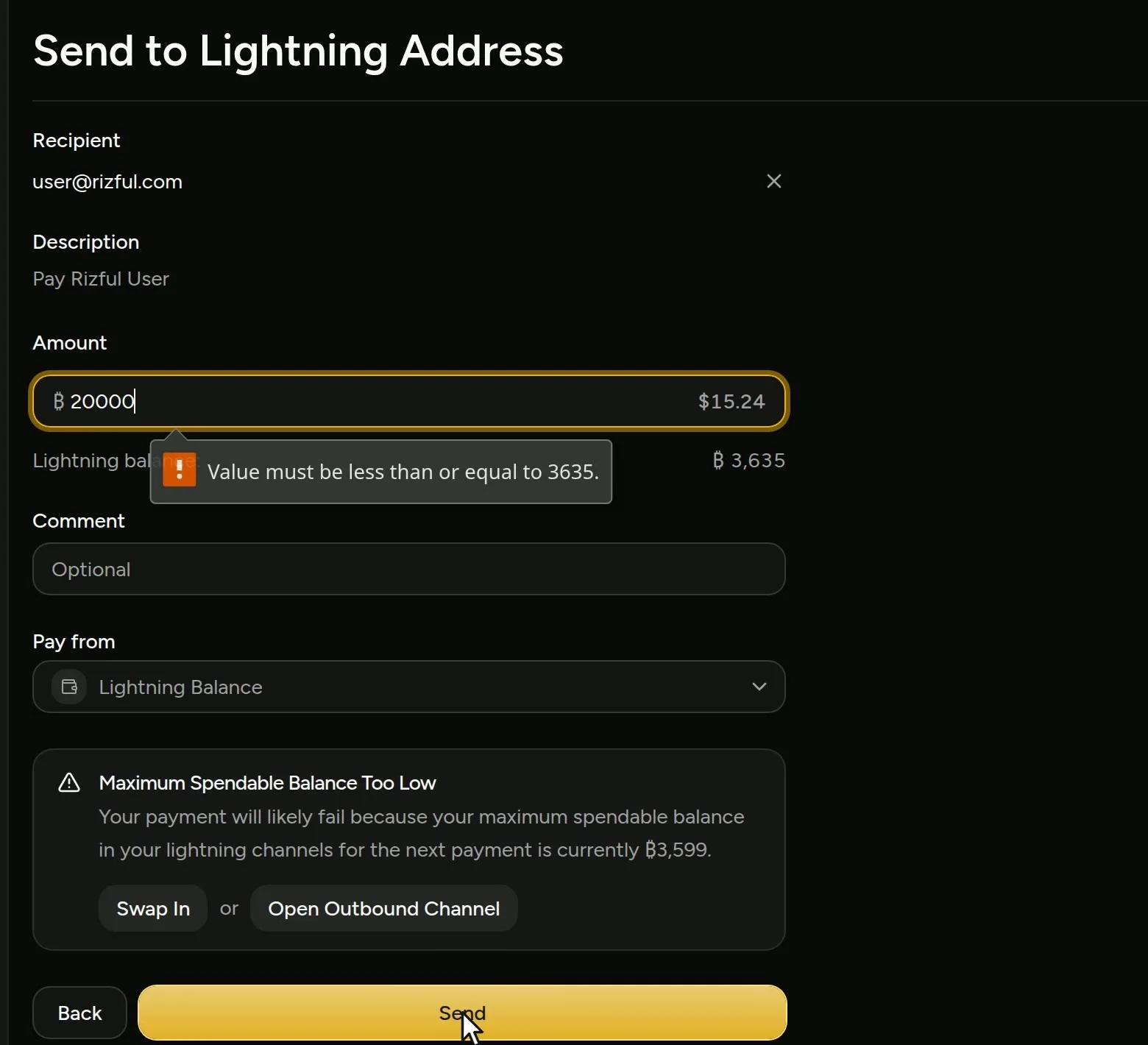
Alby Hub. Our hub held ₿3,635 (3,635 sats). We asked it to pay 20,000 sats to user@rizful.com. Alby Hub warned us first, "Maximum Spendable Balance Too Low ... your maximum spendable balance in your lightning channels for the next payment is currently ₿3,599", and its form wouldn't send more than the balance.
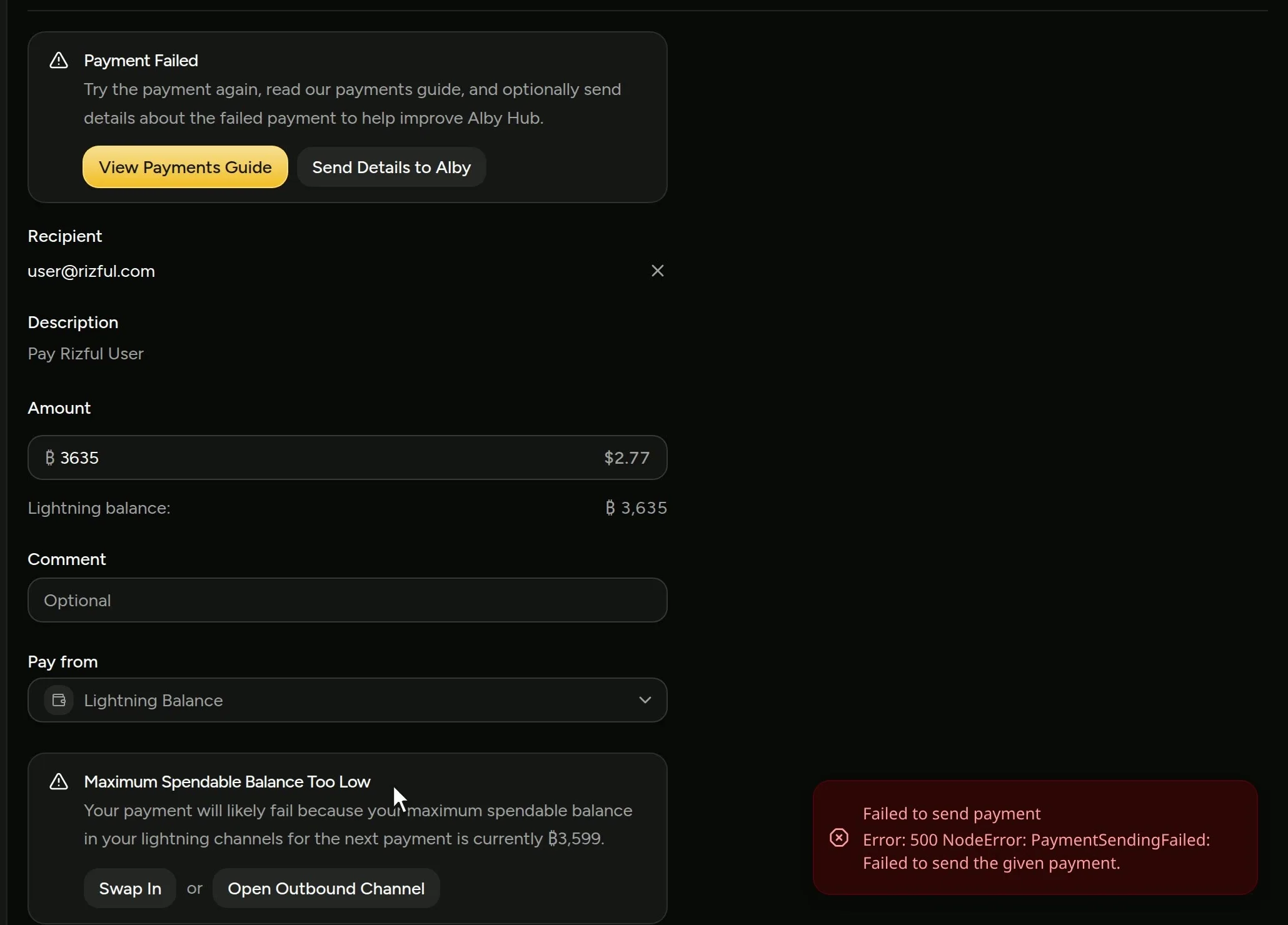
So we tried to send all 3,635. The form took it, the node tried, and the payment failed: "Failed to send payment. Error: 500 NodeError: PaymentSendingFailed: Failed to send the given payment."
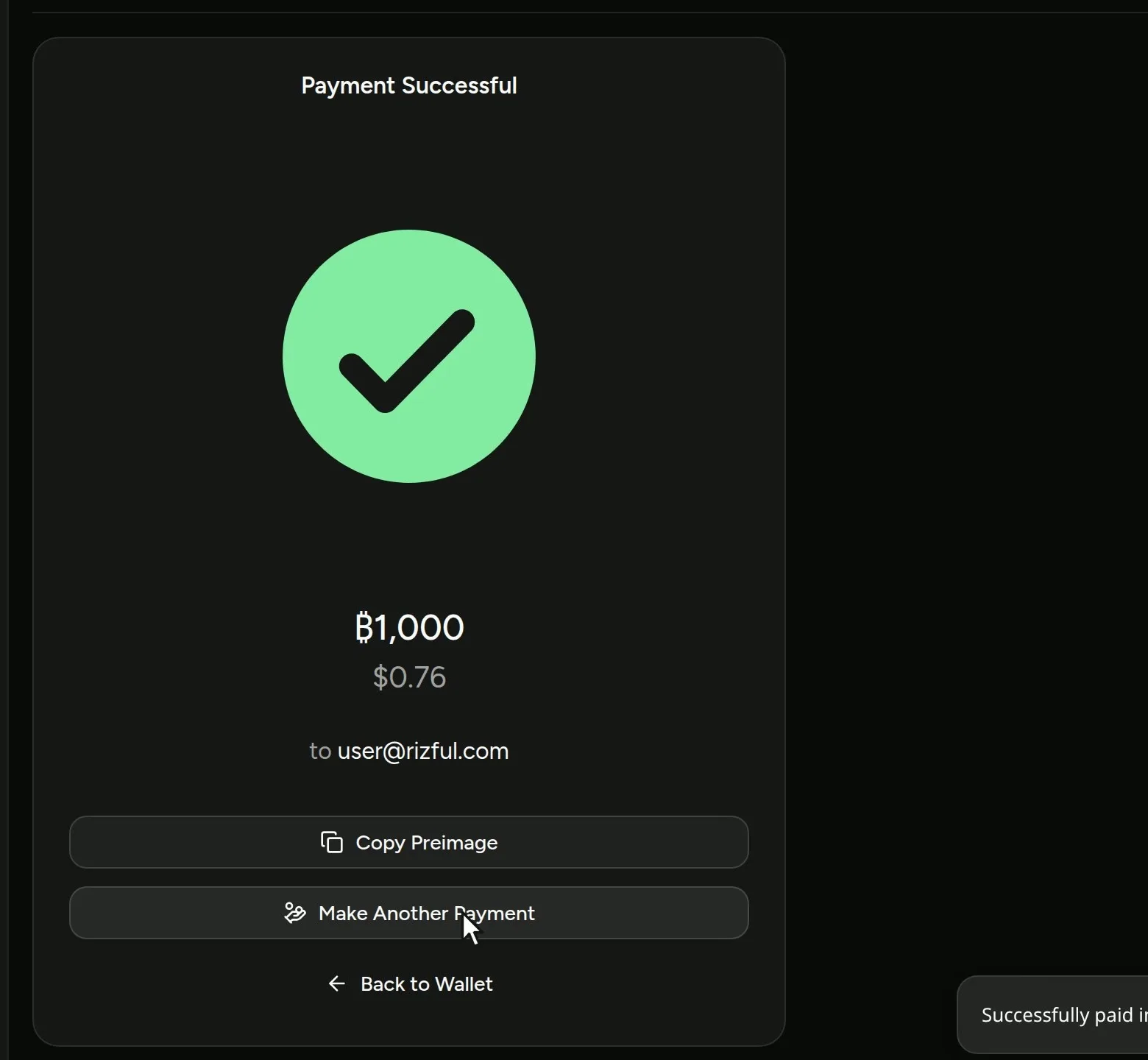
A payment has to leave a little room for routing fees, so you can't send every last sat (the hub's ₿3,599 is its balance less 1%). A smaller payment, 1,000 sats to the same address, went straight through.
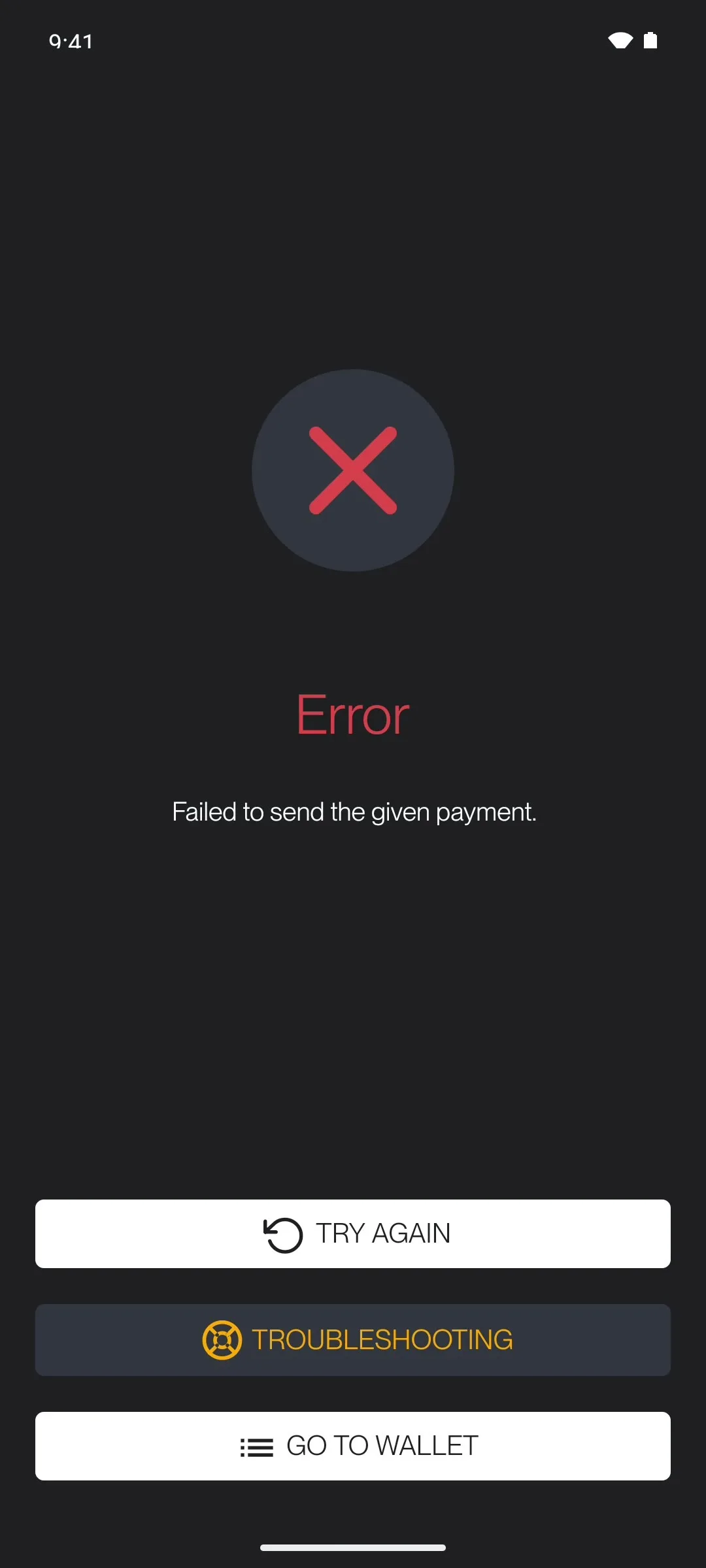
Zeus. Zeus showed 10,000 sats. We tried to send 9,500, and got "Error: Failed to send the given payment."
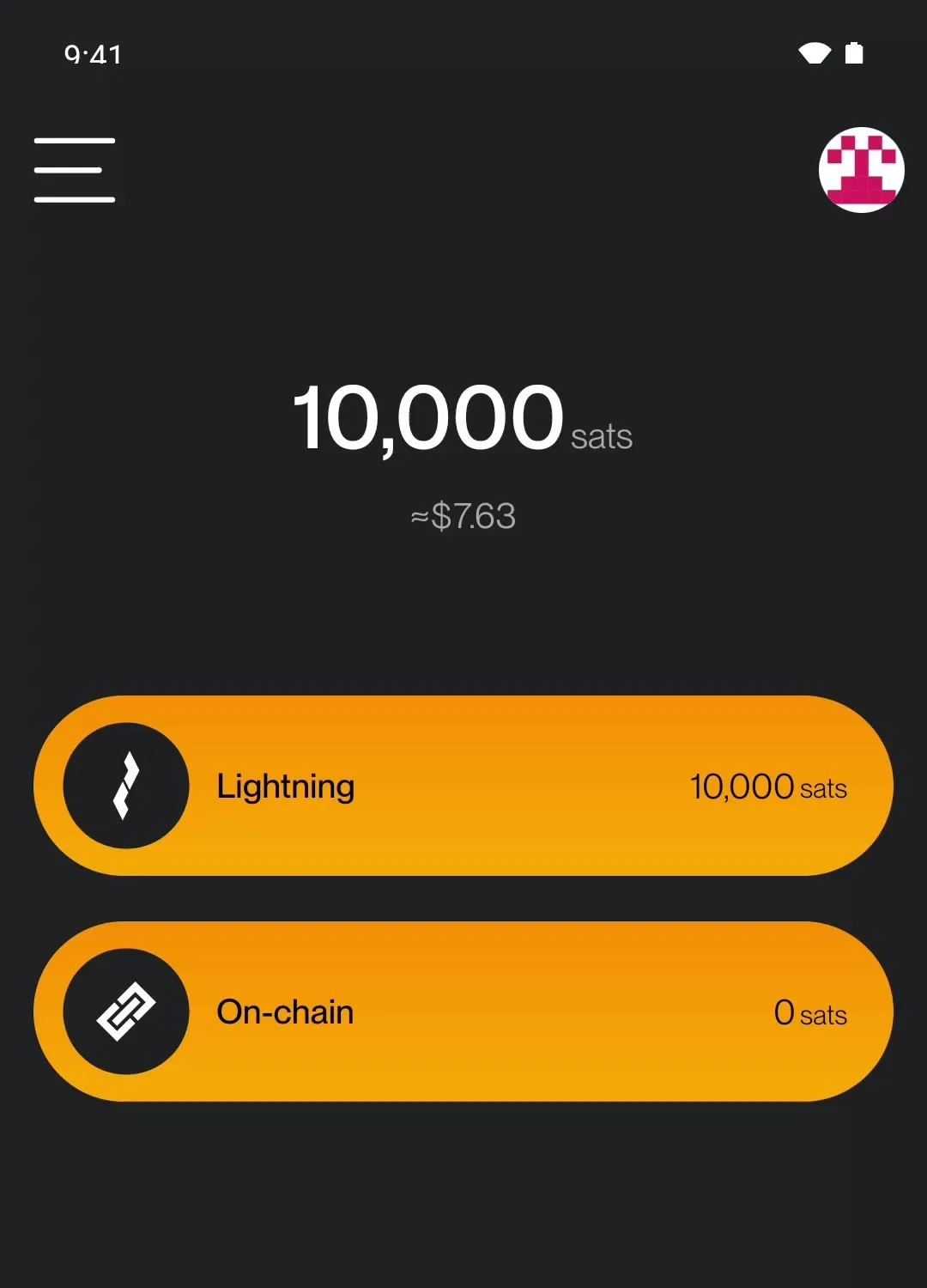
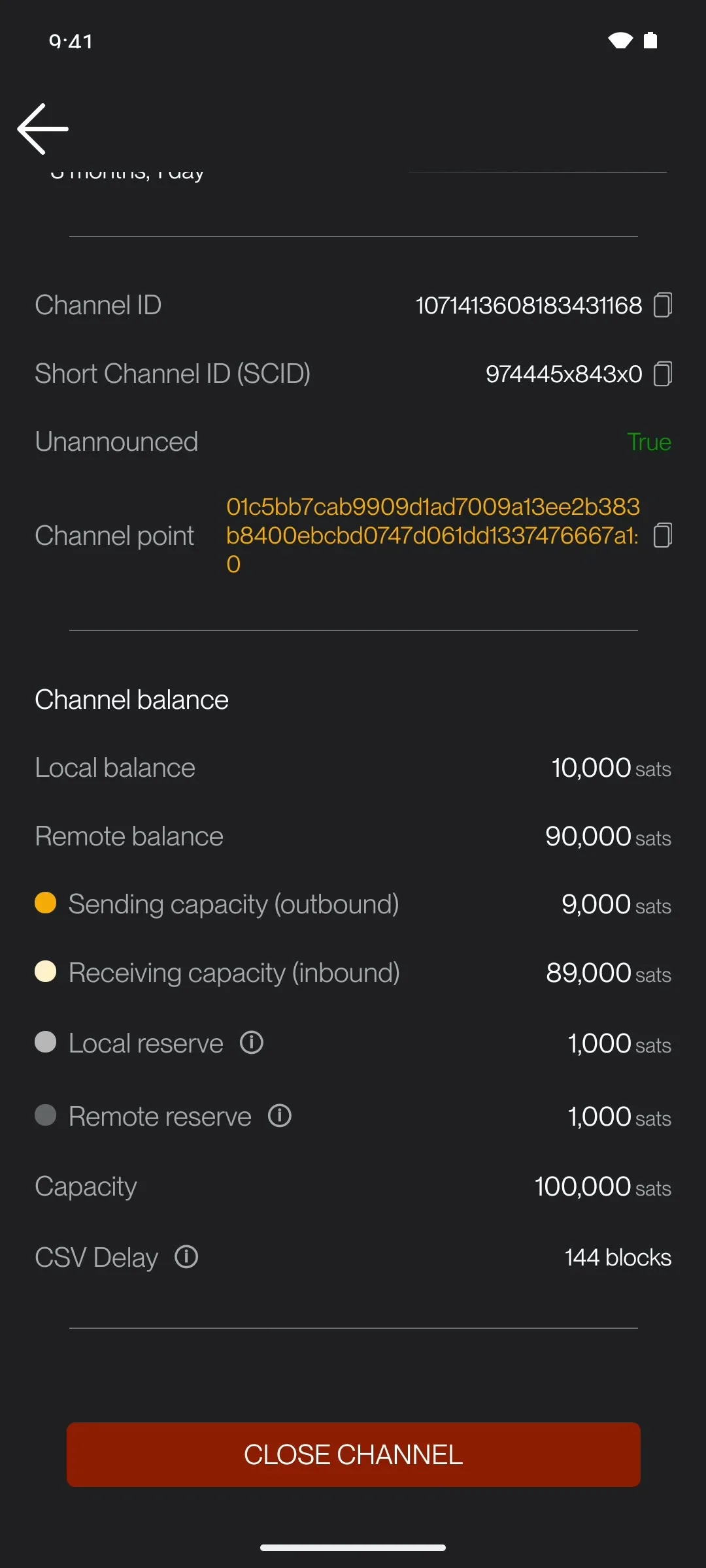
Zeus's channel screen shows why: 10,000 sats are on our side of the channel, but 1,000 of them are a local reserve that has to stay in the channel, so it can send at most 9,000 (its "Sending capacity").
Both of these wallets word it the same way, "Failed to send the given payment". Other wallets say no_route, "no route found" or "no route available for this payment". It's the same problem: your wallet couldn't find a path that can carry this payment right now.
Think of Lightning like a chain of people passing a note
A Lightning payment normally travels through several channels before it reaches the person or app you are paying.
For the payment to work, all of these things need to be true at the same time:
- Your wallet needs to be online and connected.
- The receiver needs to be reachable.
- The channels along the way need enough spendable sats in the right direction.
- The payment needs to fit within the rules of those channels.
- Any LSP involved needs to be able to do its job.
If any of those pieces fails, your wallet may shrug and say: no_route.
Very dramatic error message. Very undramatic meaning.
The most common reasons
Your wallet, node, or internet connection is having a bad day
Lightning is much pickier about connectivity than normal web browsing.
You can have internet that feels "fine" for loading websites, but is still unstable enough to make Lightning payments fail.
This is especially common if:
- Your node is running on a laptop that goes to sleep.
- Your phone wallet was closed in the background.
- Your home internet briefly dropped.
- Your Lightning node just restarted and is still catching up.
- Your first channel peer is offline.
If the sender or receiver is not properly online, a payment can fail with no_route even though everything looked fine five minutes ago.
There is not enough liquidity in the right place
This is probably the most common cause.
Lightning channels have two sides. Sats have to be on the correct side of the correct channels for a payment to move.
So a no_route error might mean:
- You do not have enough sendable balance.
- The receiver does not have enough room to receive.
- One of the channels in the middle does not have enough liquidity in the direction your payment needs to go.
Here's one real channel: our Alby Hub's channel with Megalith LSP. The sats on our side (₿3,635) are what the hub can send; the other side (₿985,350) is what it can receive. It can take in nearly a million sats, but it can't send 20,000.
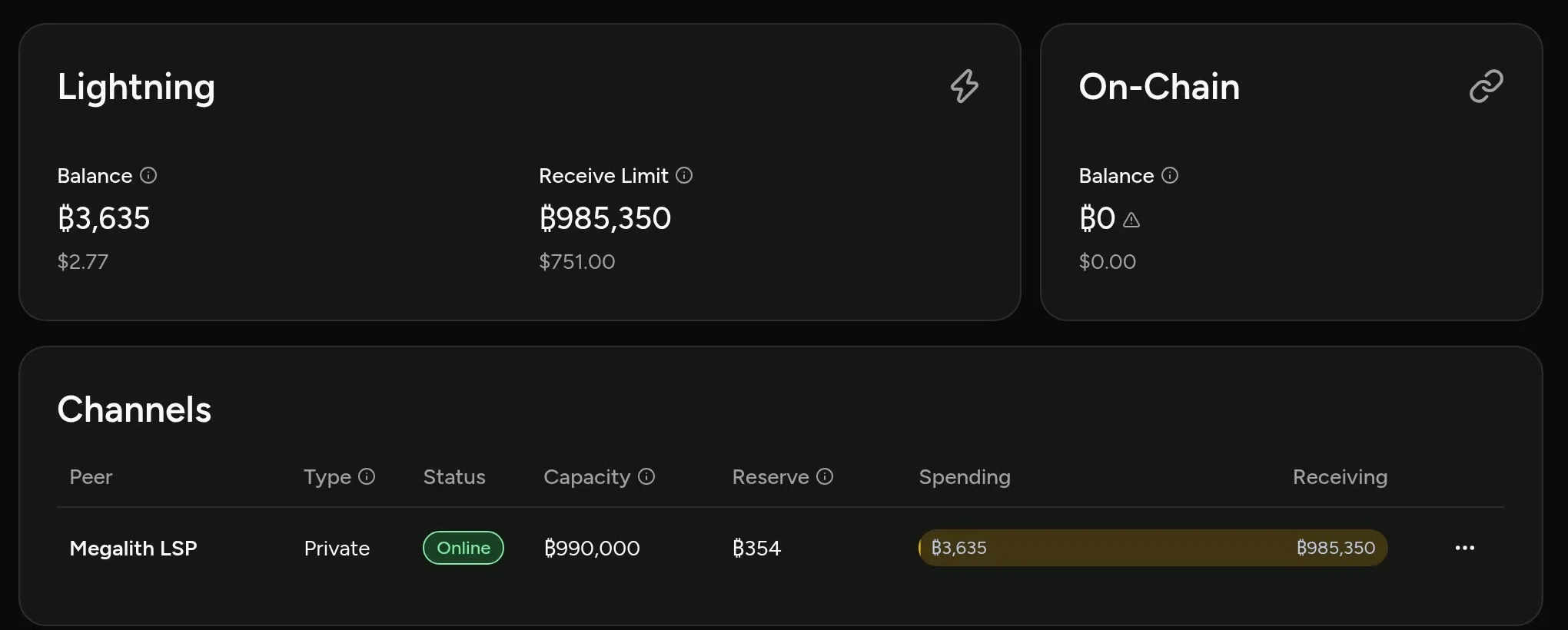
This is one of the weird parts of Lightning: a path can look like it exists, but still not have enough usable balance to carry your payment. Public maps of the network, such as mempool.space, show every public channel and how big it is, but never which side its sats are on.
The map says there is a road. The road just happens to be blocked.
The receiving node is offline
If you are paying a wallet that runs its own Lightning node on a phone, like Zeus, that wallet may need to be online to receive.
This is especially true for mobile wallets, apps using LDK, and wallets that depend on an LSP opening or managing a channel.
If the receiver's node is offline, asleep, not connected to its LSP, or just having a rough minute, the sender may see no_route.
The fix may be as simple as: ask the receiver to open their wallet, wait a minute, and generate a fresh invoice.
An LSP tried to open a channel, but could not
This one is common and confusing.
Some wallets use a Lightning Service Provider (LSP) to help users receive payments. Instead of making the user manually open a channel, the LSP opens one for them.
This can happen ahead of time with LSPS1, or just-in-time with LSPS2.
From the user's perspective, this is great. Less fiddling. More receiving sats.
But if the LSP cannot open the channel, the payment may fail as no_route.
The LSP might fail to open the channel because:
- The receiving wallet is offline.
- The LSP is temporarily out of available liquidity.
- On-chain fees moved around.
- The channel request expired.
- The LSP could not connect to the client node.
- Some boring server-side thing went wrong.
To the person trying to pay, this often looks exactly like "No Route".
In plain English: the payment was trying to reach a channel that did not successfully come into existence.
You tried to send every single sat in the channel
This one feels unfair the first time you hit it.
Let's say you have 1,000 sats on your side of a Lightning channel, and you try to send exactly 1,000 sats.
You might expect that to work. After all, 1,000 sats is 1,000 sats, right?
But Lightning channels usually require a small amount to stay behind as a channel reserve. Think of it like a minimum balance that keeps the channel healthy.
So if you try to send the entire balance, your wallet may not actually have 1,000 spendable sats. It might have 900 spendable sats. Or 800. Or zero, depending on the channel.
The result can be another lovely no_route error.
Try sending a smaller amount and leaving some sats behind.
The invoice may need a refresh
Sometimes the invoice is the problem.
This can happen if:
- The invoice expired.
- The receiver made the invoice before their wallet was fully connected.
- The receiver uses private channels, but the invoice did not include useful route hints.
- A new channel was opened very recently and the network has not learned about it yet.
- The wallet app generated something that other wallets cannot route to cleanly.
The practical fix is boring but effective: ask for a new invoice and try again.
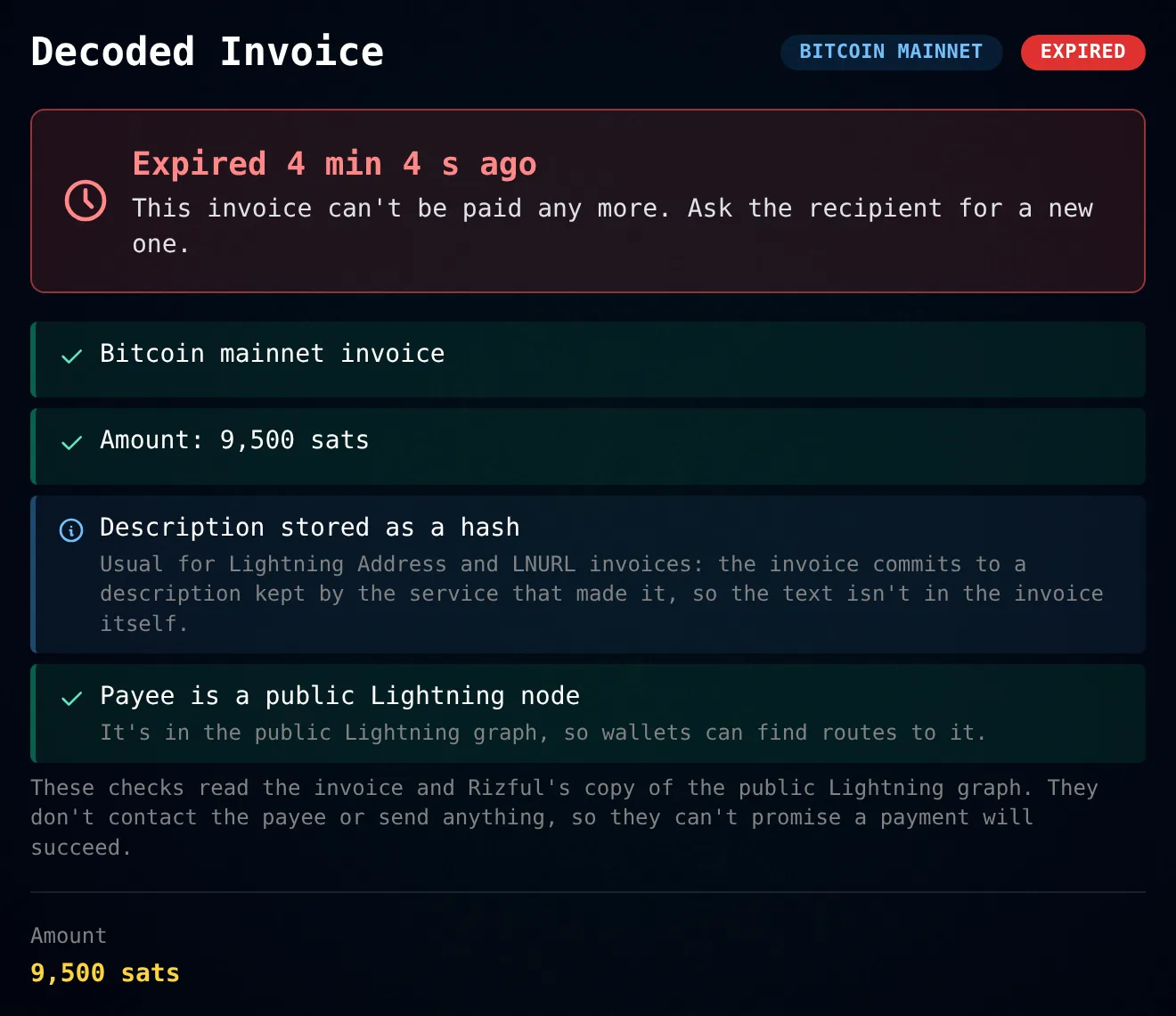
To see whether an invoice has expired, whether the payee's node is in the public graph, and which route hints it carries, paste it into the free Lightning Invoice Decoder.
The fee limit is too low
Some wallets let you set a maximum routing fee.
If that fee limit is set too low, your wallet may reject every possible route because none of them are cheap enough.
Then it may report no_route, even though a route might exist if you allowed a slightly higher fee.
You do not need to go wild here. But if your wallet has a fee setting and it is set to "basically zero," try allowing a normal routing fee and sending again.
What should I try first?
Start with the simple stuff.
- Wait a minute and try again.
- Check that your wallet is online.
- If you are receiving, keep your wallet open while the sender pays.
- Ask the receiver for a fresh invoice.
- Try sending a smaller amount.
- If you are sending your whole balance, leave some sats behind.
- If your wallet has a fee limit, make sure it is not set absurdly low.
- If you run your own node, check that your channels are active and your peers are connected.
If this is a mobile wallet using an LSP, also give the wallet a moment to connect to its LSP. Sometimes the payment is failing because the wallet and LSP are still trying to get the channel situation sorted out.
What does it probably mean in my situation?
I am trying to receive into a mobile wallet
The receiver may be offline, the LSP may not have opened a channel yet, or the wallet may need to be opened and connected.
Open the wallet, wait a minute, create a fresh invoice, and try again.
I am trying to send my entire Lightning balance
You may be running into channel reserve rules.
Try sending less than the full amount.
I just opened a new channel
The channel may not be ready yet, or the rest of the network may not know how to use it.
Wait a bit and try again.
I run my own node and payments suddenly stopped working
Check whether your peers are connected and your channels are active.
If your node has been offline, restarted, or disconnected from important peers, your wallet may need time to learn the network again.
If the channel that stopped working was with one of our nodes, see I had a channel with The Megalith Node, but it closed.
I am paying someone with private channels
Their invoice may need better route hints.
Ask them to generate a new invoice from their wallet while it is online.
How to stop it happening
Most of the time, no_route comes back to one thing: the sats in a channel are on the wrong side. Here are three ways to stop worrying about it.
-
Never manage a channel: use Rizful. It's a free Lightning account in your browser. You don't run a node, so there are no channels to open or balance, and it's made by the team behind The Megalith Node, one of the most central routing nodes on Lightning, so payments usually settle in under a second.
If you take payments on a website or in an app, OpenReceive, the safe way to receive bitcoin and stablecoin payments for websites and apps, takes them straight into your Rizful account with a receive-only code. Rizful is always online and receiving is free, so there's no receiving capacity for you to manage. See Accept Bitcoin Payments With OpenReceive.
-
Run your own node with Alby Hub, with a channel from Megalith. To receive, a node needs sats on the far side of its channels, and Alby Hub suggests Megalith to provide them. When we did it, 1,000,000 sats of receiving room cost 18,507 sats and the channel opened in seconds. The whole order is in 6 Best Bitcoin Lightning Wallets.
-
Already run a node? Get an inbound channel from Megalith LSP. Connect your node to Megalith LSP, choose the channel size, paste your node's public key and pay the price it shows. Megalith opens a channel to your node with the sats on its side, so your node can receive, and it stays open for at least three months. Step by step: How to Get an Inbound Channel From Megalith LSP.
The big picture
no_route is not one problem. It is a bucket of problems.
It can mean bad connectivity, not enough liquidity, an offline receiver, a failed LSP channel opening, a too-strict fee limit, an invoice issue, a new channel that is not ready, or a channel reserve that prevents you from sending every last sat.
Annoying? Yes.
Fatal? Usually no.
Most of the time, the fix is one of the classics: wait a minute, keep the wallet online, use a fresh invoice, try a smaller amount, or make sure the channel has real spendable liquidity.
Lightning is fast when all the pieces line up. When they do not, no_route is often the wallet's unhelpful way of saying: "I tried, but I could not find a path that works right now."